Showing posts with label GenericEBSerrors. Show all posts

Tuesday, August 20, 2019

Submit concurrent request from back end (Solved)


Submit concurrent request (Solved)

Or

How to submit concurrent request in Oracle from backend or frontend?


There are two parts of this question:


1.     
          Submit concurrent request from backend.

and
2.   
          Submit concurrent request from Oracle form.

If we talk about its first part which is

Submit concurrent request from backend
Or
Submit concurrent request from pl/sql


I assume you know how to submit any request from front end if you don’t know you should read second part first otherwise keep reading.


We have to login into the oracle applications, navigate to respective responsibility and finally submit the concurrent program for its execution. (As illustrated in second part)


But challenge arise when we have to submit a concurrent program from an integrated development environment like Toad and SQL Developer.

Here comes the solution.


Firstly we need to initialize the apps environment to submit a concurrent request from back-end.


We will use the built-in function (APPS_INITIALIZE ) to initialize the apps environment and the syntax is:


APPS.FND_GLOBAL.APPS_INITIALIZE(user_id,
                                                                    responsibility_id,
                                                                    application_responsibility_id
                                                                    );

Now challenge comes from where we can have all these IDs?

We can extract these values from backend by using following tables
 or
we can extract the values from the Oracle Application menu  i.e.

 Help > Diagnostic > Examine >
Select  “$PROFILES$” in “Block Field” and select required field in “Field” and you can have your required value in “Value” section. As illustrated below:

submit concurrent request in Oracle from backend or frontend?


Submit concurrent request from Toad

submit concurrent request in Oracle from backend or frontend?

These can be queried from following tables:


SELECT user_id
  FROM fnd_user
WHERE user_name like 'ALI'     --(or write your username here instead of ALI)


SELECT responsibility_id, application_id
  FROM  fnd_responsibility_tl
WHERE responsibility_name like 'System Administration'          --(replace ‘System Administration’ --with your target responsibility)

SELECT application_short_name
  FROM  fnd_application
WHERE application_id = (write application id here which you extracted from above )


Now, after initializing the apps environment, execute the API,

APPS.FND_REQUEST.SUBMIT_REQUEST();

function FND_REQUEST.SUBMIT_REQUEST
               ( application,    ---- IN varchar2 default NULL
                 program,        ----IN varchar2 default NULL
                 description,    ----IN varchar2 default NULL
                 start_time,      ----IN varchar2 default NULL
                 sub_request,  ----IN boolean default FALSE
                 argument1,
                 argument2, ..., argument99,
                 argument100);    ---- this function will return number

application: application short name in which your concurrent program is registered

as illustrated below


unable to submit concurrent program from backend


submit concurrent program from backend


Run Concurrent Request from back-end

SELECT application_short_name
 FROM fnd_application
WHERE application_id = 0----(write application id here which you extracted from above )

Input arguments:

Program: Concurrent Program Short name

Description: It is optional. If you want to add any particular description you can use this.

start_time:  time at which the program should start executing (optional)

sub_request:  ‘TRUE’, if the program is being submitted from any other program otherwise ‘False’

argument1, argument2, ...argument99, argument100 
Parameters for the concurrent program in sequence if any required


Example:


Declare
v_req_id number;

begin              

APPS.FND_GLOBAL.APPS_INITIALIZE(1,       --user_id,
                                                                       20,     --responsibility_id,
    1)       --application_responsibility_id

dbms_output.put_line('Initialized ' || v_req_id);  ----better to add this at every step while working

v_req_id:= APPS.FND_REQUEST.SUBMIT_REQUEST(
                                'FND', ----  application short name IN varchar2 default NULL
                                'FNDSCURS', ----CONCURRENT program NAME IN varchar2 default NULL,
                                 Null,               ----description    IN varchar2 default NULL,
                                 sysdate,           ----start_time     IN varchar2 default NULL,
                                 FALSE);          ----sub_request    IN boolean default FALSE

dbms_output.put_line('Request Submitted and Request Id is: ' || v_req_id);                                      

Commit;                                     

dbms_output.put_line('Commit Executed.');

if v_req_id >0 then

dbms_output.put_line('Request submitted Successfully and Request ID is: ' || v_req_id);

else

dbms_output.put_line('Request submission Failed. ' || v_req_id ||' and sqlerrm:  ' || sqlerrm);

end if;

exception when others then
dbms_output.put_line('Error while submitting Concurrent Request');

end;

/


After writing it (let us try in Toad) first start the DBMS output and then select the whole script and press “F9”. And then again press “Refresh” button in DMS output and check what messages are shown there.

as shwon below:

Run Concurrent Request from  Toad
Run Concurrent Request from  Toad
left most round button is to start debuging after that select your code and hit "F9" button and then refresh and messages will be shown.


at the end of first part of this question let me describe other possible form of this question, so that maximum people can reach to the solution (I will really appreciate your patience if it bothers you)  

unable to submit concurrent program from backend
submit concurrent program through backend
submit a concurrent request from backend
how to submit concurrent request from backend
submit concurrent program from backend in r12
submit concurrent program from backend in oracle apps
pl/sql script to submit a concurrent request from backend
submitting the concurrent request from backend
submit concurrent request from oracle form
oracle submit concurrent request from pl sql
how to submit concurrent request from oracle forms
submit concurrent request  from pl/sql


If we talk about its second part which is

Submit concurrent request from Oracle form.


Solution: 

You need to login in Oracle Application and then switch to respective responsibility.
Rest of procedure I am illustrating beneath for your ease because you know

“A picture speaks louder than words”
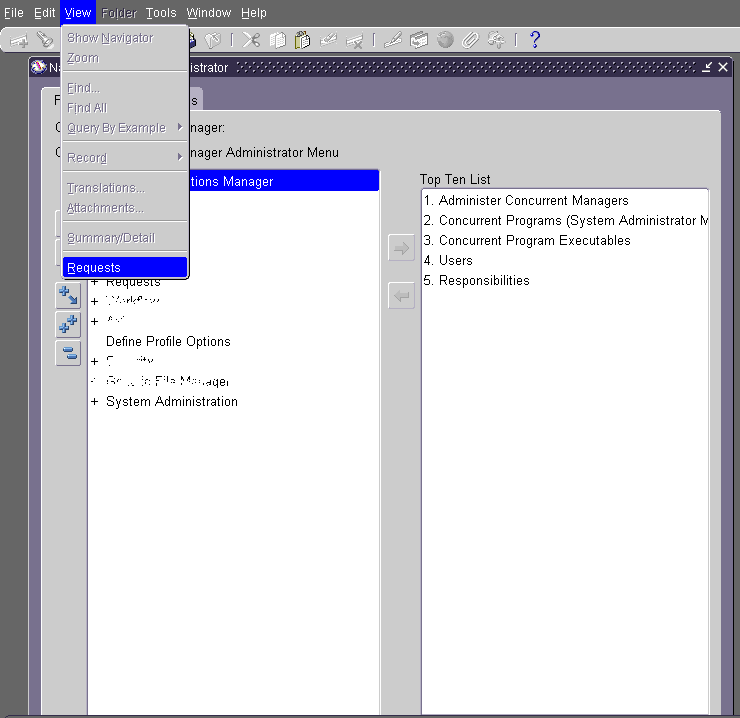

RUN Oracle concurrent request from back end

RUN Oracle concurrent request from back end


RUN Oracle concurrent request from back end

RUN Oracle concurrent request from back end

RUN Oracle concurrent request from back end

RUN Oracle concurrent request from back end

This request does not have any parameter to define so press "OK". 


RUN Oracle concurrent request from back end

RUN Oracle concurrent request from back end

RUN Oracle concurrent request from back end

finally to view the output press "View Output" button.


At the end let me describe other possible form of this question, so that maximum people can reach to the solution (I will really appreciate your patience if it bothers you)  


How to submit concurrent request from Oracle Form
How to submit concurrent request from frontend
Cannot submit concurrent request from Oracle Form
Unable to submit concurrent request from Oracle Form


reference: when I was first time trying to run concurrent request from back end I followed following website:

Thursday, February 7, 2013

Purchase Requisition is not sending to next approver, getting error APP-PO-14288 when viewing action history

Purchase Requisition is not sending to next approver, getting error APP-PO-14288 when viewing action history


Problem: When approving a Purchase Requisition it is not being forward to next approver, Also when we try to  view action history getting the error APP-PO-14288.

Solution:
Remove the Approval Transaction Type from Document type (Purchase Requisition)
Purchasing Super User > Setup >  Document types
Step-1 Locate the Document type Requisition Purchase, Click on update button.
Purchase Requisition is not sending to next approver
APP-PO-14288 when viewing action history
 Step-2 Remove the value written in Approval Transaction Type make it empty, and click on Apply button.
Purchase Requisition is not sending to next approver
APP-PO-14288 when viewing action history

Step-3 Run the Workflow Background Process concurrent request form system administrator. Preferably schedule it.

Purchase Requisition is not sending to next approver
APP-PO-14288 when viewing action history

Step-4 Enter a new purchase requisition and retest the issue. It is important to test the issue with a new purchase requisition document.
  

Thursday, November 15, 2012

Oracle/PLSQL: ORA-01843 Error

Oracle/PLSQL: ORA-01843 Error

Today when I was developing Oracle Form in Oracle Form Builder I got the error

"Oracle/PLSQL: ORA-01843 Error" when I googled this error I found the following solution on www.techonthenet.com

Actually I was assigning the string value to date type column as illustrated below:

Oracle PLSQL ORA 01843
Oracle/PLSQL: ORA-01843 Error

:MS_HEADER.CREATION_DATE := '11/15/2012 15:03:34';

but it should be as follows:

:MS_HEADER.CREATION_DATE := to_date('11/15/2012 15:03:34','mm/dd/rrrr hh24:mi:ss');

solution is below:

Oracle/PLSQL: ORA-01843 Error

Error Message

ORA-01843: not a valid month

Cause of Error

You entered a date, but the month portion of the date was not a valid month.

Resolution

The option(s) to resolve this Oracle error are:
  1. Re-enter the date value using either a MONTH format mask.
The valid values for month are:
January, February, March, April, May, June, July, August, September, October, November, December.
Or you could use the MON format mask and use one of the following values:
Jan, Feb, Mar, Apr, May, Jun, Jul, Aug, Sep, Oct, Nov, Dec.
If all else fails, you may want to consider using the to_date function and specifying the date format mask.

ref:http://www.techonthenet.com/oracle/errors/ora01843.php

Thursday, November 8, 2012

FRM-92050 failed to connect to Server

FRM-92050 failed to connect to Server


I was facing this problem and found solution from following link:
 http://focusthread.com/blog/oracletraining/funcional/frm-92050-failed-to-connect-to-server-formsservlet-1-applet-forms-not-opening-on-ie8/

above link contains following material.

FRM-92050 failed to connect to Server /forms/servlet -1


If you are trying to connect to Apps 11i/R12 instance from IE 8 and hitting error “FRM-92050 failed to connect to Server /forms/servlet -1“  while opening forms (as shown in figure below)

FRM-92050 failed to connect to Server /forms/servlet -1

Then check version of IE

FRM-92050 failed to connect to Server /forms/servlet -1


FRM-92050 failed to connect to Server /forms/servlet -1


If version of IE is 8 then disable XSS filter
FRM-92050 failed to connect to Server /forms/servlet -1

Steps to disable XSS filter
FRM-92050 failed to connect to Server /forms/servlet -1

FRM-92050 failed to connect to Server /forms/servlet -1

FRM-92050 failed to connect to Server /forms/servlet -1


frm-92191 there was a failure in the form server during startup

frm-92191 there was a failure in the form server during startup


I was facing following problem when I was trying to run form from Oracle Form Builder 10g.

frm-92191 there was a failure in the form server during startup

I have googled this and found some useful tips to remove this error which I am sharing below.

First of all I have followed the below link

https://sites.google.com/site/craigsoraclestuff/oracle-forms---how-to-s/forms-how-to-configure-forms-builder-to-run-forms-locally

and made changes accordingly in forms configuration (as explained in above link).

Secondly, I also found the metalink note for this too which is  604633.1 (please visit this on support.oracle.com for latest version).

Master Note For Known Causes of FRM-92101 Error In Forms [ID 604633.1]


In this Document
Purpose
Troubleshooting Steps
I. Forms Configuration issues.
II. Specific form related issues.
II. a) RUN_REPORT_OBJECT related issues
II. b) WEBUTIL related issues
II. c) Other issues
III. Platform configuration issues.
References

Applies to:

Oracle Forms - Version 10.1.2 to 10.1.2.3.0 [Release 10.1.2 to 10.1.2.3]
Information in this document applies to any platform.

Purpose

Checked for Version Accuracy- 07-Feb-2011
This note provides the most famous and popular situations where the error "FRM-92101: There was a failure in the Forms Server during startup.  " can be encountered.

Troubleshooting Steps


I. Forms Configuration issues.

1) Form is not compiled using the option COMPILE_ALL=YES
Solution
-----------
Compile the form using COMPILE_ALL=YES
e.g. frmcmp.sh module=[FormName] type=FORM userid=[user/pwd@db] COMPILE_ALL=YES....

Note 444690.1 Forms FRM-92050, FRM-92100, FRM-92101, FRM-92102 Reference Guide
2) Load balancer is used, but session binding mechanism is not correctly set.
Note 268830.1 Webcache Won't Load Balance 2 Forms Instances
Note 465583.1 FRM-92102 When Using A Software Load Balancer With Forms
Note 563817.1 Using Apache 2 "mod_proxy_balancer" in Load Balancing Forms
3) Long Running Query prevents the Forms Runtime process from acknowledging the client that it is in a waiting state.
Note 271611.1 Long Running Query / Procedure Causes Web Deployed Forms to Disconnect?
Note 415758.1 FRM-92101- HTTP Server Timeout at Long Running Queries
4) WorkingDirectory is incorrectly set in the formsweb.cfg file
Note 313050.1 Form Fails With FRM-92101 And Java.Lang.Numberformatexception: For input string ""
Note 334369.1 How To Set FORMS_PATH For Different Forms Applications Running in Static Mode
Note 432708.1 FRM-92101 Error in Application.log: Unable to Switch to Working Directory
5) FORMS_TIMEOUT is set to a value smaller than HEARTBEAT
Note 549735.1 Description List For Parameters Affect Timeout In Webforms
Note 375585.1 How To Avoid The Error Message FRM-92101 When Form Session Times Out
6) JVM Termination due to OS signals
Note 286584.1 - Getting Error FRM-92102 Intermittently with JVM Termination in Application.log
7) NLS related settings when activating Forms traces
Note 371444.1 FRM-92101 When Enabling Tracing In Webform For Any Tracegroup
8) NLS_LANG faulty settings
Note 433763.1 FRM-92101 and FRM-93000 when using Javabean on UNIX
9) Tracegroup is set in the URL
Note 434881.1 Form Hangs When Tracegroup Is Enabled
10) A log file grew more than 2GB (default-web-access.log)
Note 338805.1  OC4J_BI_Forms Instance Keeps Restarting Continuously


11) Formservlet is not deployed after installation of patch 9593176.

Note 1188127.1 Oracle Forms 10.1.2.3 Bundle Patch Frequently Asked Questions

Note 1058514.1 Forms Servlet (frmsrv.jar) Not Updated After Patching to 10.1.2.3


II. Specific form related issues.


II. a) RUN_REPORT_OBJECT related issues

Note 553840.1 How To Troubleshoot Frm-92101 When Using Run_Report_Object to Call Reports
1) Call RUN_REPORT_OBJECT when webutil is used
Note 365320.1 Webutil and Run_Report_Object Conflict, FRM-92101
2) Linux x86 RUN_REPORT_OBJECT
Note 342291.1 Forms 10g RUN_REPORT_OBJECT Fails With FRM-92101 / FRM-93000 on Red Hat Linux
3) Call RUN_REPORT_OBJECT while REPORT_FILENAME is set to NULL
 Note 795092.1  RUN_REPORT_OBJECT Fails with FRM-92101 When REPORT_FILENAME is NULL
4) Calling a report after setting REPORT_FILENAME property to a file with length > 75 characters

Note 444222.1 FRM-41203: Integration Error: Invalid parameterlist id Appears While Running Forms with Longer REPORT_FILENAME Parameter

5) Entering invalid password when running a form generated by Headstart

Note 392495.1 FRM-92101 When Wrong User Connection Instead Of ORA-1017 With Headstart Generated Form


II. b) WEBUTIL related issues

1) Using WEBUTIL.CLIENT_HOST in blocking mode

Note 452473.1 Webutil Clienthost Throws FRM-92102 Exception When Closing Notepad 15 Mins After Opening
2) Using Webutil_file.Directory_filtered_list on a Folder that Contains More than 1500 Files 
Note 465110.1 FRM-92101 or FRM-40735 When Using Webutil_file.Directory_filtered_list on a Folder that Contains More then 1500 Files
3) Webutil library is attached to another library on Vista
Note 736075.1  Running Forms Including Webutil on Vista causes "APPCRASH" error in the Browser, and FRM-92101
4) Writing more than 10922 Lines using CLIENT_TEXT_IO
Note 341899.1  WUC-14 And WUC-12 While Writing Many Lines by CLIENT_TEXT_IO
5) Uploading a file using Webutil upload functionality
Note 865610.1 Error FRM-92101 When Trying to Upload a File Using Webutil Upload Functionality

II. c) Other issues

1) Scroll bar issues after applying 10.1.2.2
Note 417048.1 Form Crashes With FRM-92101 After Applying 10.1.2.2 Patchset
2) Mouse Scroll Wheel issues after applying 10.1.2.2
Note 457919.1 After Updating To Forms 10.1.2.2 Mouse Scroll Wheel Crashes Forms: FRM-41839 FRM-92101
3) Background / Foreground Color is set and Fill Pattern is set to None
Note 359934.1 FRM-92101 When Forms Window Has Background / Foreground Color Set and Fill Pattern Set to None
Note 417693.1 FRM-92101 When Opening Forms Application that contains Block Scrollbar
4) Tree nodes and 10.1.2.0.2
Note 362442.1 Assertion Failed Error and FRM-92101 With Usage Of When-Mouse-Doubleclick Trigger For a Tree.
5) Using SET_VA_PROPERTY('Xx',Xx_color, NULL);
Note 356718.1 FRM-92101 Using Set_va_property('Xx',Xx_color, X); When X=Null
6) Canceling a query when Interactive Mode is set to Non-Blocking
Note 461586.1 ORA-12157, ORA-3114, FRM-92101 WHEN USING INTERACTION MODE NON-BLOCKING
7) Calling RDBMS package while not connected
Note 388106.1 FRM-92101 FRM-93000 When Forms Not Connected And A Stored Program unit is called (eg DBMS Package)
8) Using PLSQL_TABLE.* functions in the Forms trigger
Note 271249.1 FRM-92101 When Running A Form Based On Stored Procedure
9) Calling a DB package with nested table
Note 271412.1 form Crashes If Passing Record Type Variable With Nested Table From The Database
10) Stack Overflow
Note 405057.1 FRM-92101,FRM-93000 While Using Javabean to Export Data From RDBMS to Excel
11) Bean Area CANVAS property is set to NULL
Note 580337.1 How To Avoid FRM-92101 If no Canvas is Attached to a Java Bean Item
12) Using TO_VARIANT  built-in
Note 422024.1 Forms 9.0.x OR 10.1.2.x Fail With FRM-92101 When Using TO_VARIANT
13) Modifying a form with attached libraries in the builder before connecting to Database
Note 330497.1 Form With WebUtil.pll Attached Unexpectedly Crashes At Runtime With FRM-92101
14)  Modifying the expired password, but the new password does not meet the conditions defined in PASSWORD_VERIFY_FUNCTION
Note 755377.1 Frm-92101 While Changing Password During Logon

III. Platform configuration issues.

1) Windows heapsize
Note 187455.1 FRM-92101, FRM-92050 and FRM-93000 Error When Running Forms After a Number of Concurrent Connections and No New Connection Possible
Note 393163.1 How To Check Utilization of "Desktop Heap" on MS Windows Platforms Using "dheapmon"
2) Windows updates have been installed on the client
Note 362085.1 Getting FRM-92101 If Windows Client Using Sun JDK plug-in 1.4.x Has MS KB912945 Patch Installed
3) Maximum number of processes per user (maxuprc) is small.
Note 565774.1 FRM-92101 occurs when more than 200 sessions connect to Forms on HP-UX
4) Using Windows WLBS Drainstop
Note 559703.1 Forms Sessions Being Terminated When Using WLBS Drainstop
5) Improper replacing of forms run time files on the fly
Note 286762.1 How to Replace Forms Runtime Files in Production Environments 'On The Fly'
Note 151618.1 "Unable to Replace .fmx Files 'On The Fly' During Forms Runtime"
6) kernel.threads-max is set to a low value
Note 375478.1 FRM-92101 And Internal Server Error When Creating A New Session
7) LD_ASSUME_KERNEL is not set in the default.env
Note 304781.1 Forms Hangs Intermittently On Redhat AS 3 with FRM-92100
8) openmotif is of higher version
Note 312276.1 FRM-92101 Starting Test Module in a Fresh Installed Oracle Applicationserver
9) Too Many Open Files fs.file-max
Note 415448.1 FRM-92101 Formsweb: Java.Io.Ioexception: Too Many Open Files on Linux
Note 422143.1 How To Find The Number Of Open Files For a Process Name and Process pid?
10) Installing new JDK version on AIX
Note 417208.1 REP-0132: COULD NOT START A JVM AFTER UPGRADE OF JDK TO 142 CA142-200604 (SR5)
Note 417075.1 Getting FRM-92101 / Frmweb_dump after installing new jdk version on AIX
11) Forms MAKEFILE error when upgrading to 10.1.2.3
Note 564747.1 FORMS MAKEFILE ERROR WHEN UPGRADING TO 10.1.2.3 ON LINUX 64BIT SERVER
12) No swap devices configured
Solution
-----------
- Terminate some processes (preferably ones that are using a lot of virtual memory)
- Add swap space to your system. The method for adding swap space to a system varies
between UNIX variants: consult your operating system documentation or vendor for details.
You can use the commands listed below for adding, deleting, and monitoring the system swap areas for the associated operating system:

SUN Solaris                       #/usr/sbin/swap -l
HP 9000 Series HP-UX     # /etc/swapinfo
Digital UNIX                      % /usr/sbin/swapon -s
IBM RS/6000 AIX            % /etc/lsps -a
Note 17094.1 TECH: Unix Virtual Memory, Paging & Swapping explained
Note 69083.1 Common UNIX Commands Available on Most UNIX Platforms
13) Solaris 10 installation is missing some packages and patches
Note 554628.1 Running Test Form on Fresh Installation of Application Server on Solaris 10 Gives Error: FRM-92101
14) Using RUN_REPORT_OBJECT on SolarisNote 846950.1 Forms 10g RUN_REPORT_OBJECT Fails With FRM-92101 / FRM-93000 on Solaris

15) EXECUTE_QUERY or Scrolling on Solaris
Note: 888244.1 FRM-92101 When Executing EXECUTE_QUERY Built-in Concurrently or Scrolling in a Master-Detail Block

References

NOTE:1058514.1 - Forms Servlet (frmsrv.jar) Not Updated After Patching to 10.1.2.3
NOTE:1188127.1 - Oracle Forms 10.1.2.3 Bundle Patch Frequently Asked Questions (FAQ)
NOTE:151618.1 - Unable to Replace .fmx Files 'On The Fly' During Forms Runtime
NOTE:17094.1 - TECH: Unix Virtual Memory, Paging & Swapping explained
NOTE:187455.1 - FRM-92101, FRM-92050, FRM-93552 and FRM-93000 Error When Running Forms After a Relatively Small Number (50 - 80) of Concurrent Connections and No New Connection Possible
NOTE:268830.1 - Webcache Won't Load Balance 2 Forms Instances
NOTE:271249.1 - FRM-92101 When Running A Form Based On Stored Procedure and using PLSQL_TABLE
NOTE:271412.1 - Form Crashes If Passing Record Type Variable With Nested Table From The Database
NOTE:271611.1 - Long Running Query / Procedure Causes Web Deployed Forms to Disconnect?
NOTE:286584.1 - Getting Error FRM-92102 Intermittently with JVM Termination in Application.log
NOTE:286762.1 - How to Replace Forms Runtime Files in Production Environments 'On The Fly'
NOTE:304781.1 - Forms Hangs Intermittently On Redhat AS 3 With FRM-92100
NOTE:312276.1 - FRM-92101 Starting Test Module in a Fresh Installed Oracle Applicationserver
NOTE:313050.1 - Form Fails With FRM-92101 And Java.Lang.Numberformatexception: For input string ""
NOTE:330497.1 - Form With WebUtil.pll Attached Unexpectedly Crashes At Runtime With FRM-92101
NOTE:334369.1 - How To Set FORMS_PATH For Different Forms Applications Running in Static Mode
NOTE:338805.1 - OC4J_BI_Forms Instance Keeps Restarting Repeatedly
NOTE:341899.1 - WUC-14 And WUC-12 While Writing Many Lines by CLIENT_TEXT_IO
NOTE:342291.1 - Forms 10g RUN_REPORT_OBJECT Fails With FRM-92101 / FRM-93000 on Red Hat Linux
NOTE:356718.1 - FRM-92101 Using Set_va_property('Xx',Xx_color, X); When X=Null
NOTE:359934.1 - FRM-92101 When Forms Window Has Background / Foreground Color Set and Fill Pattern Set to None
NOTE:362085.1 - Getting FRM-92101 If Windows Client Using Sun JDK plug-in 1.4.x Has MS KB912945 Patch Installed
NOTE:362442.1 - Assertion Failed Error and FRM-92101 With Usage Of When-Mouse-Doubleclick Trigger For a Tree.
NOTE:365320.1 - Webutil and Run_Report_Object Conflict, FRM-92101
NOTE:371444.1 - FRM-92101 When Enabling Tracing In Webform For Any Tracegroup
NOTE:375478.1 - FRM-92101 And Internal Server Error When Creating A New Session
NOTE:375585.1 - How To Avoid The Error Message FRM-92101 When Form Session Times Out
NOTE:388106.1 - FRM-92101 FRM-93000 When Forms Not Connected And A Stored Programunit called (eg DBMS Package)
NOTE:392495.1 - FRM-92101 When Wrong User Connection Instead Of ORA-1017 With Headstart Generated Form
NOTE:393163.1 - How To Check Utilization of "Desktop Heap" on MS Windows Platforms Using "dheapmon"
NOTE:405057.1 - FRM-92101,FRM-93000 While Using Javabean to Export Data From RDBMS to Excel
NOTE:415448.1 - FRM-92101 Formsweb: Java.Io.Ioexception: Too Many Open Files on Linux
NOTE:415758.1 - FRM-92101- HTTP Server Timeout at Long Running Queries
NOTE:417048.1 - Form Crashes With FRM-92101 After Applying 10.1.2.2 Patchset
NOTE:417075.1 - Getting FRM-92101 / frmweb_dump After Installing New JDK Version on AIX
NOTE:417208.1 - REP-0132: COULD NOT START A JVM AFTER UPGRADE OF JDK TO 142 CA142-200604 (SR5)
NOTE:417693.1 - FRM-92101 When Opening Forms Application That Contains Block Scrollbar
NOTE:422024.1 - Forms 9i or 10g Prior To 10.1.2.3 Fail With FRM-92101 When Using TO_VARIANT
NOTE:422143.1 - How To Find The Number Of Open Files For a Process Name and Process pid?
NOTE:432708.1 - FRM-92101 Error in Application.log: Unable to Switch to Working Directory
NOTE:433763.1 - FRM-92101 and FRM-93000 when using Javabean on UNIX
NOTE:434881.1 - Form Hangs When Tracegroup Is Enabled
NOTE:444222.1 - FRM-41203: Integration Error: Invalid parameterlist id Appears While Running Forms with Longer REPORT_FILENAME Parameter
NOTE:444690.1 - Master Note for Forms FRM-92050, FRM-92100, FRM-92101, FRM-92102 Reference Guide
NOTE:452473.1 - Webutil Clienthost Throws FRM-92102 Exception When Closing Notepad 15 Mins After Opening
NOTE:457919.1 - After Updating To Forms 10.1.2.2 Mouse Scroll Wheel Crashes Forms: FRM-41839 FRM-92101
NOTE:461586.1 - ORA-12157, ORA-3114, FRM-92101 WHEN USING INTERACTION MODE NON-BLOCKING
NOTE:465110.1 - FRM-92101 or FRM-40735 When Using Webutil_file.Directory_filtered_list on a Folder that Contains More than 1500 Files
NOTE:465583.1 - FRM-92102 When Using A Software Load Balancer With Forms
NOTE:549735.1 - Description List For Parameters Affect Timeout In Webforms
NOTE:553840.1 - How To Troubleshoot Frm-92101 When Using Run_Report_Object to Call Reports
NOTE:554628.1 - Running Test Form on Fresh Installation of Application Server on Solaris 10 Gives Error: FRM-92101
NOTE:559703.1 - Forms Sessions Being Terminated When Using WLBS Drainstop.
NOTE:563817.1 - Using Apache 2 "mod_proxy_balancer" in Load Balancing Forms
NOTE:564747.1 - FORMS MAKEFILE ERROR WHEN UPGRADING TO 10.1.2.3 ON LINUX 64BIT SERVER
NOTE:565774.1 - FRM-92101 occurs when more than 200 sessions connect to Forms on HP-UX
NOTE:580337.1 - How To Avoid FRM-92101 If no Canvas is Attached to a Java Bean Item
NOTE:69083.1 - Common UNIX Commands Available on Most UNIX Platforms
NOTE:736075.1 - Running Forms Including Webutil on Vista causes "APPCRASH" error in the Browser, and FRM-92101
NOTE:755377.1 - Frm-92101 WHILE CHANGING PASSWORD DURING LOGON
NOTE:795092.1 - RUN_REPORT_OBJECT Fails with FRM-92101 When REPORT_FILENAME is NULL
NOTE:846950.1 - Forms 10g RUN_REPORT_OBJECT Fails With FRM-92101 / FRM-93000 on Solaris
NOTE:865610.1 - Error FRM-92101 When Trying to Upload a File Using Webutil Upload Functionality
NOTE:888244.1 - FRM-92101 When Executing EXECUTE_QUERY Built-in Concurrently or Scrolling in a Master-Detail Block


Your feedback/comment is quite important for improving this blog so feel free to leave your comments & suggestions